

Today’s post is about supercharging your YouTube Shorts performance!
Time to Stop Losing Your YouTube Shorts to Overlays. How? Use Adobe Express Margin Templates!
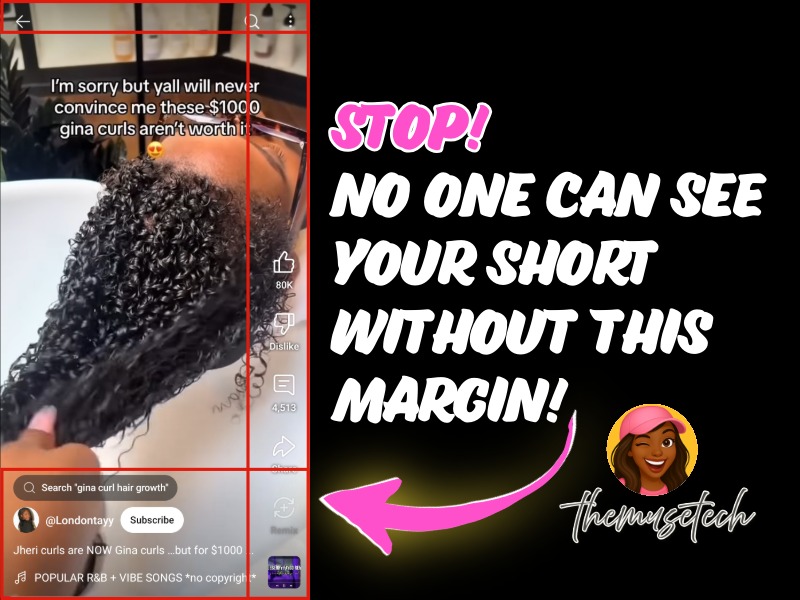
Before you dive into crafting perfect titles, digging into analytics, or sprinkling in those clickable keywords that pull viewers in, you’ve got to make sure people can actually see your content. Social platforms plaster overlays all over your Shorts—likes, subscribes, comments, search bars, related video links, the works. That junk eats up valuable space, hiding your brilliance like a bad filter. I was pumping out Shorts, thinking my clever text and visuals were killing it, only to find half my witty lines were lost under the UI. Almost swiped past my own video. Brutal.

Took a screenshot from my phone and uploaded to Adobe Express.

Created a margins over each overlay section.

Adjusted my asset layouts within the new margins.
So, I threw together a margin template, tweaked my latest Short, and tested it. What a difference! Total game-changer. Do yourself a favor: create margin templates for every platform you post to. It’s a quick fix that ensures your followers—and potential new fans—see your work, not the app’s clutter. Make it happen! Need to know how to make margin template? Totally let me know and I will make a video, pronto!
Now go spread your fabulousness and make sure people can see it and celebrate you!


You must be logged in to post a comment.